The Extension I Built, and the IDE I Stopped Needing
By this point Rider was gone and PyCharm was gone. One application was still sitting on my machine, and I opened it for exactly one thing: to look at an XML file. That application was Android Studio, and this post is about how I got rid of it too. In the last post I showed you the extensions that replaced Rider. This one is about the extension that didn’t exist, so I had to write it. Let’s go!
The last reason I kept Android Studio
The project I work on is .NET Android, and it has a lot of XML: layouts, drawables, vectors. I need to look at them. Not constantly, but often enough that “just build and run the app to see it” is a terrible answer.
The previews were unreliable in Rider, so Android Studio stayed installed for exactly that. Open the file, look at the picture, close it again. Gigabytes of IDE for a quick look, with barely an edit most of the time.
Have you ever kept a whole tool installed for one feature? It’s a strange thing to notice about yourself, and once you notice it, it’s hard to stop noticing.
Why the existing extensions didn’t help
There are several XML preview extensions for VS Code, and I tried them.
The ones I found expect a Gradle project. They go looking for res/layout/, which is where a native Android project keeps its resources. A .NET Android project keeps them under Resources/, so the extensions look, find nothing, and there’s nothing more to discuss.
That’s not a criticism. They were written for the ecosystem their authors work in, which is the right thing to do. It just meant that for .NET Android, the answer was “install Android Studio”, and I’d already decided I was done with that answer.
So I built Inflate
Inflate renders Android XML previews inside VS Code, and it works on both ecosystems.
The important part is how it draws. It doesn’t approximate the layout with HTML or a custom renderer. It runs layoutlib, the same rendering engine Android Studio itself uses, so what you see is real inflation, measure and draw. If it renders differently from Android Studio, that’s a bug rather than a limitation.
And it doesn’t care which build system you use. It works off the XML and the resource-tree conventions that Gradle and .NET Android share, instead of driving either build. So res/layout/ and Resources/layout/ are both first class, and nothing invokes Gradle or MSBuild, ever.
A few practical things worth knowing:
- You need a JDK between 17 and 24 on your machine. Inflate finds it automatically and never downloads or bundles a JVM itself. Watch the upper bound: a colleague of mine was on Java 25 and it refused to run, which is the rendering engine’s limit rather than mine.
- The first preview triggers a one-time download of the rendering engine, about 170 MB, from Google’s Maven repository. After that it works offline.
- You can flip day and night, change device, density and orientation from a toolbar, with no manifest edits.
- There’s an
Inflate: Doctorcommand that reports what it detected and what the last render did. That’s the first place to look when something seems wrong.
It’s free and open source under Apache-2.0. The code is on GitHub, and besides the VS Code Marketplace it’s published on Open VSX too, so it works in editors that can’t use Microsoft’s marketplace.
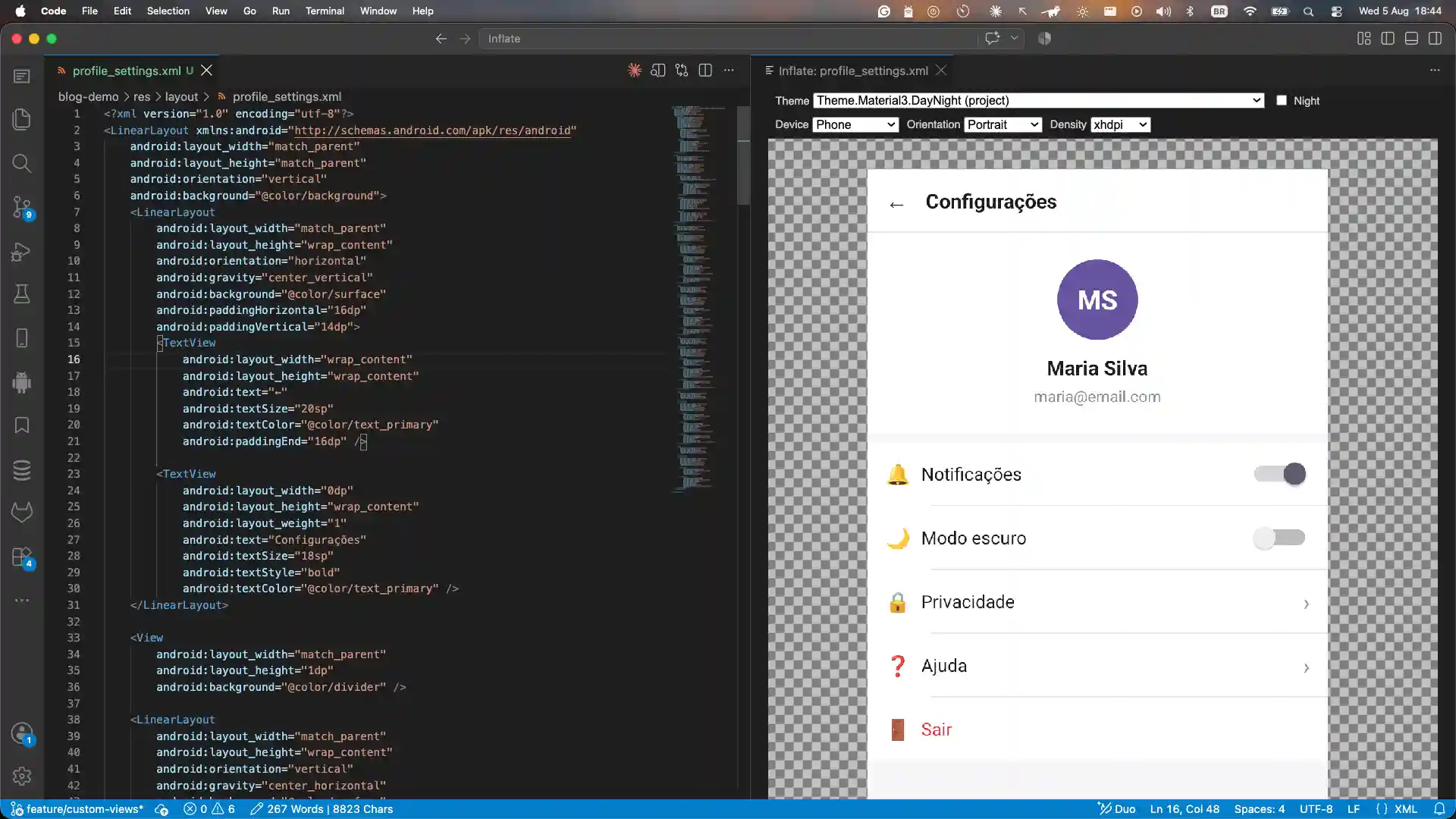
Then I uninstalled Android Studio.
The Android SDK, by hand
Removing Android Studio raises an obvious question: where does the Android SDK come from now?
You set it up yourself, and it’s less painful than it sounds. Here’s what I did on macOS:
brew install --cask android-commandlinetools

mkdir -p "$HOME/Library/Android/sdk"

yes | sdkmanager --sdk_root="$HOME/Library/Android/sdk" \
  "cmdline-tools;latest" "platform-tools" "emulator" \
  "platforms;android-35" "build-tools;37.0.0"

yes | sdkmanager --sdk_root="$HOME/Library/Android/sdk" --licenses

brew uninstall android-commandlinetools
Look at the first and last lines, because that part isn’t decoration. The first time I tried this, I installed the command line tools with Homebrew and then installed the Android packages on top, and ended up with a split installation: the tools in one place, the packages somewhere else. One Android SDK spread across two directories, and no single path for ANDROID_HOME to point at.
So I did it again deliberately. Homebrew is only there to bootstrap. I use its sdkmanager once, with --sdk_root pointing at the directory I actually want, to install cmdline-tools;latest and everything else into that one place. Then I remove the Homebrew copy. What’s left is a self-contained SDK that manages itself from then on, and one directory for ANDROID_HOME.
My machine is cleaner than it has been in years. Rider, PyCharm and Android Studio are all gone.
Xcode is still there, of course. Apple doesn’t give me a choice about that one, and I’m not going to pretend otherwise. Although I’ll admit I’ve started wondering whether I could do my Firefox iOS contributions from VS Code too. If you want the story of how I got into that project, I wrote about it here.
Now, the question I promised you
Two posts ago I said I’d come back to this, so here it is.
Inflate was built entirely with AI agents. I used Claude Code with the TLC Spec-Driven skill, which runs the work through phases: write the spec, design it, break it into tasks, then implement.
I want to be precise about what that means, because “built with AI” is doing a lot of work in that sentence. My job was to stay focused on what I actually needed and to review the specs until I was sure they’d get me there. Every decision was mine. The agent wrote the code; I decided what the code should be. If you’re curious how that looks in practice, the decision records are in the repository.
So: a layoutlib-backed renderer, running out of process, for two build ecosystems, with device and density configuration and a diagnostic command. That’s not a weekend script. And it exists because I described it carefully and reviewed it honestly, not because I typed it.
Now put that next to the list from the last post.
Almost every extension I installed was for reading, navigating and inspecting. Almost none of them help me write code. And the tool I built to escape a heavyweight IDE was itself built by an agent.
If the writing is increasingly done by an agent, and my day is mostly reading, reviewing and deciding, then why exactly was I paying for a heavyweight IDE?
That’s my honest answer, and I’ll name its limits too. It’s one developer, one stack, one project. I still miss dotTrace and dotMemory, and I haven’t gone looking for replacements. I’m not telling you to uninstall anything. Plenty of people get enormous value from Rider every day, and they’re not wrong.
But I spent years saying a code editor wasn’t enough to write software seriously, and I was wrong. Maybe I was wrong the whole time. Maybe the job changed underneath me and I only noticed when a broken deploy forced me to look. I genuinely don’t know which, and I find that more interesting than having an answer.
Do you see it differently? Tell me in the comments. And if you work with .NET Android, install Inflate and tell me what breaks. I’d like to know.
Happy coding and choose the best tools for work!